How to Create an Invoice: Accounting Software & InvoiceFBR Guide
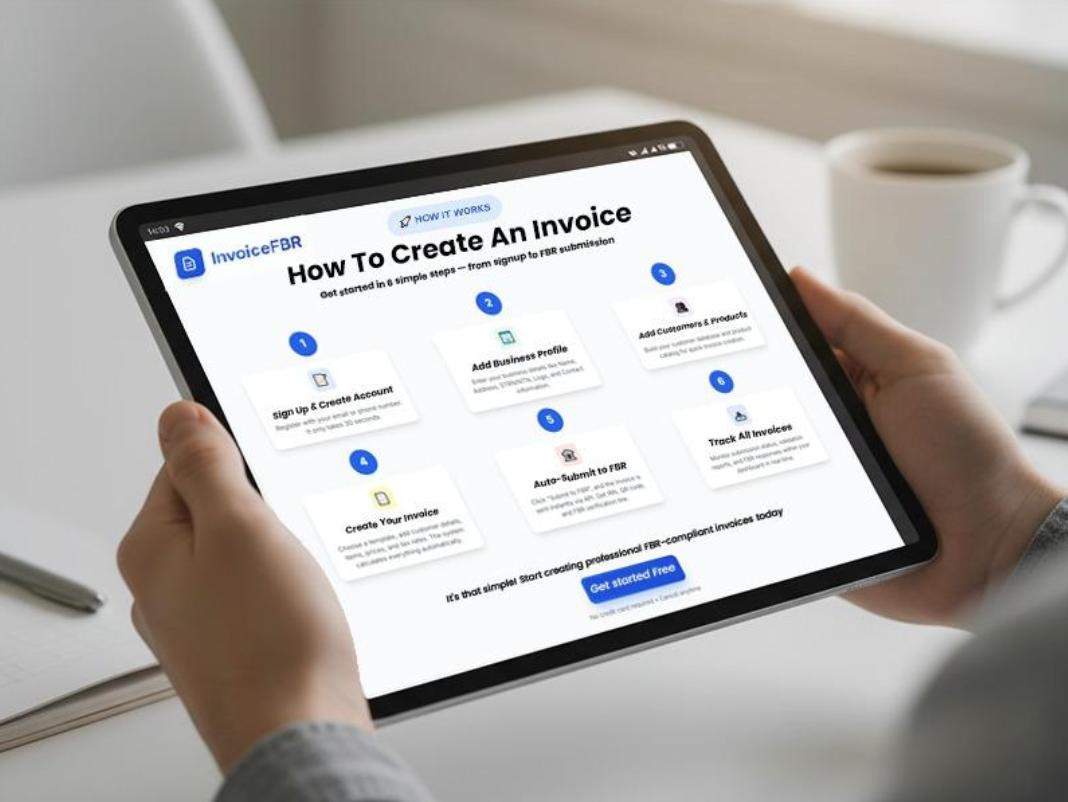
How to Create an Invoice: Accounting Software & InvoiceFBR Guide
Learn how to create an invoice in 2026 using Excel, Word, accounting software & [InvoiceFBR](https://invoicefbr.com). Complete digital invoicing guide for businesses. Get started today!
Why Creating an Invoice is Essential for Your Business
Invoices serve as official records of sales and services. They always protect both you and your customers legally. Generate an invoice correctly to prevent payment conflicts down the line.
Using [FBR Digital Invoicing Software](https://invoicefbr.com) helps create accurate invoices and gives your business a professional and reliable appearance. It also assists in monitoring revenue and improving management. For more details on FBR requirements, check our [Complete Guide to FBR Digital Invoice Compliance](/blog/fbr-digital-invoice-compliance-guide-2024).
Effective invoicing systems enhance your cash flow considerably in the long run. Customers are fully aware of their balance and payment deadlines. Transparent invoices minimize misunderstandings. Accelerate payment completion. It is simple to monitor which clients have settled their bills. Accurate invoicing is essential for taxation and audit requirements.
Step-by-Step Guide: How to Create an Invoice
Producing an invoice involves a straightforward, organized procedure. Adhering to these guidelines guarantees that all essential details are included. Every component plays a role in effective communication. Omitting any part might result in payment setbacks or misunderstandings. Below is what you should do:
Steps to Create a Complete Invoice:
Avoid common mistakes that can delay payments. Learn more in our guide on [10 Common Invoicing Mistakes Pakistani Businesses Make](/blog/10-invoicing-mistakes-pakistani-businesses).
Creating an Invoice Using Microsoft Excel: Tips & Templates
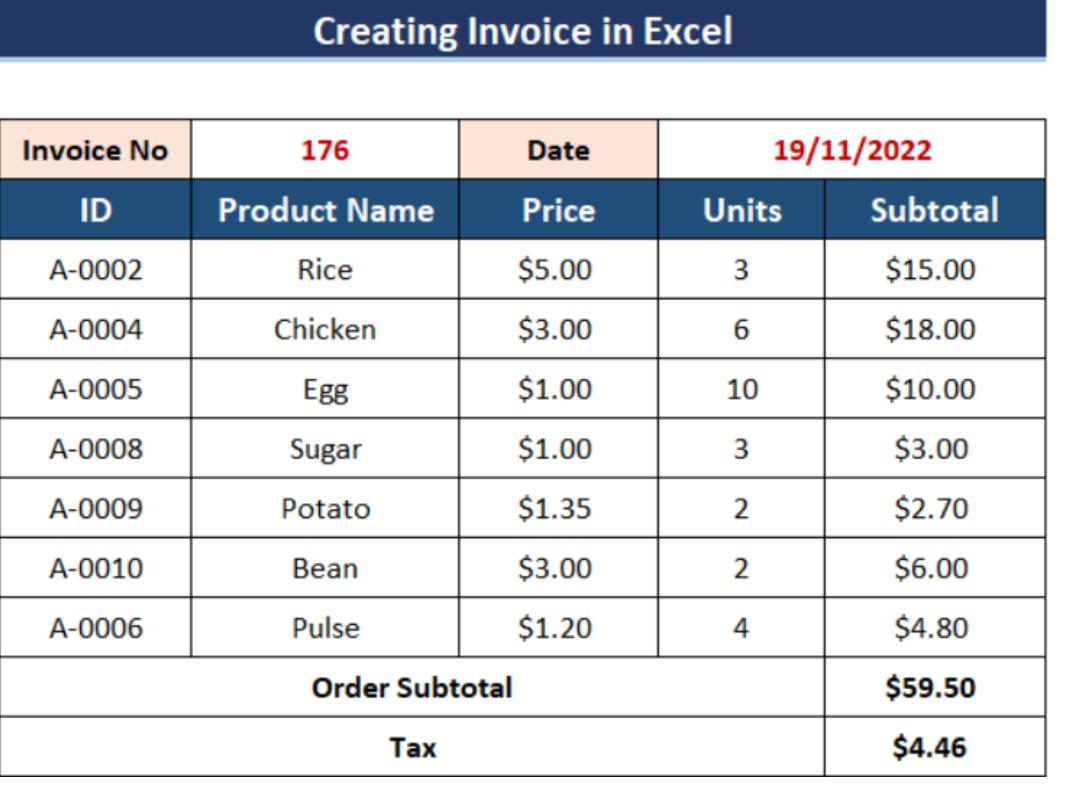
Excel offers free built-in invoice templates you can use. Open Excel and search for "invoice" in the template gallery. Choose a template that matches your business style perfectly. Customize the header with your business logo and details. Excel automatically calculates totals when you enter prices correctly.
Excel Invoice Creation Process:
Save your customized template for reusing with future clients easily. Use Excel formulas to calculate taxes and discounts automatically. Format cells to display currency symbols and decimal places. Add your brand colors to make invoices look professional. Excel files are easy to email or print quickly.
While Excel works for basic needs, [InvoiceFBR](https://invoicefbr.com) offers automated FBR compliance and professional templates that save hours of manual work.
Creating an Invoice Using Microsoft Word: Easy Formatting Tricks
Word provides simple invoice templates that look clean and professional. Download free templates from Microsoft's official template website directly. An invoice using accounting software offers more features than Word, though. Word works great for occasional invoicing needs and simplicity. Insert tables to organize items and prices neatly together.
Word Invoice Setup Steps:
Use Word's header and footer sections for business information. Add borders and shading to make sections stand out. Save your customized template as a Word document file. Convert finished invoices to PDF before sending to clients. Word invoices are perfect for small businesses starting.
For FBR-compliant invoices with automatic tax calculations, consider switching to [InvoiceFBR's professional invoicing platform](https://invoicefbr.com).
Using Accounting Software to Generate Professional Invoices
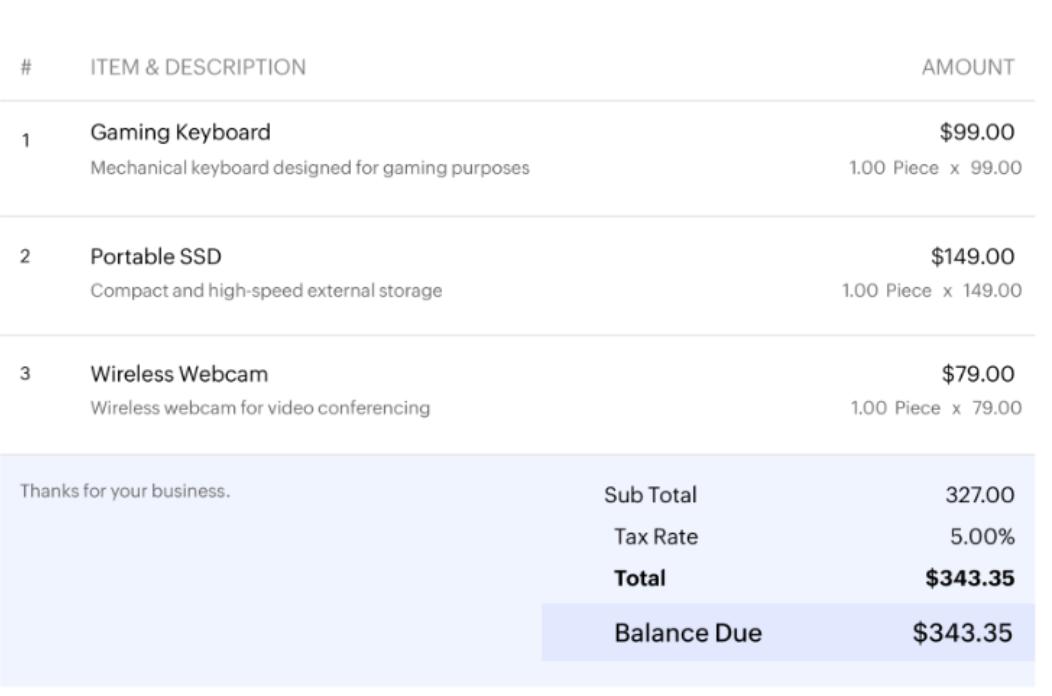
Accounting software automates most of the invoicing process completely. Programs like QuickBooks, FreshBooks, and [InvoiceFBR](https://invoicefbr.com) create invoices in minutes. Invoice using accounting software saves time and reduces manual errors. These tools store all client information for quick access. They automatically track which invoices are paid or overdue.
Want to save even more time? Read our guide on [How to Automate Your Invoice Workflow and Save 10 Hours Per Week](/blog/automate-invoice-workflow-save-time).
Accounting Software Invoice Process:
Digital invoicing can reduce accounting errors by up to 95%. Learn more in our article on [How Digital Invoicing Can Reduce Accounting Errors](/blog/reduce-accounting-errors-digital-invoicing).
How to Create an Invoice Quickly with InvoiceFBR
[InvoiceFBR](https://invoicefbr.com) is Pakistan's leading digital invoicing platform for FBR compliance. Register your business on the [InvoiceFBR portal](https://invoicefbr.com/register) to get started. Log in to your InvoiceFBR account dashboard to start creating. Fill in the buyer information using their registration number automatically.
For a complete walkthrough on connecting your business to FBR, see our [FBR Integration Guide for Pakistani Businesses](/blog/fbr-integration-guide-pakistani-businesses).
InvoiceFBR Invoice Creation Steps:
Benefits of Using InvoiceFBR for Digital Invoicing
[InvoiceFBR](https://invoicefbr.com) invoices are legally recognized by tax authorities immediately. The system reduces paperwork and saves physical storage space. Digital invoicing guide features help you understand FBR requirements easily. Automatic tax calculations prevent costly mistakes and penalties later. The QR codes allow instant verification of invoice authenticity.
Key Benefits of [InvoiceFBR](https://invoicefbr.com):
Need help with GST calculations? Check our comprehensive [GST and Sales Tax Guide for Pakistani Businesses](/blog/gst-sales-tax-guide-pakistan-businesses).
Choosing Between Excel, Word, and Software Solutions
Excel works best for businesses with simple invoicing needs. Word is perfect for occasional invoices and small operations. Professional invoicing software like [InvoiceFBR](https://invoicefbr.com) suits growing businesses with many clients. Consider your monthly invoice volume before choosing a method. Think about whether you need automatic payment tracking features.
Budget plays a role in selecting the right solution. Free Excel and Word templates cost nothing to use. Professional accounting software requires monthly or yearly subscription fees. [InvoiceFBR offers affordable plans](https://invoicefbr.com/pricing) starting from basic to enterprise levels. Choose something easy for you to use consistently.
For more accounting tips, read our [Essential Accounting Tips for Small Businesses in Pakistan](/blog/small-business-accounting-tips-pakistan).
Conclusion
Creating professional invoices is crucial for business success and growth. You have multiple options, from Excel to specialized software. Each method offers different features for different business sizes. [InvoiceFBR](https://invoicefbr.com) provides official digital invoicing for Pakistani businesses specifically.
Start with simple templates if you're just beginning operations. Upgrade to [InvoiceFBR](https://invoicefbr.com) as your business grows for automated FBR compliance. Always include complete information and review before sending out.
Want to get paid faster? Don't miss our [5 Proven Strategies to Get Paid Faster](/blog/improve-cash-flow-faster-invoice-payments).
---
Frequently Asked Questions
Is InvoiceFBR mandatory for all Pakistani businesses?
FBR digital invoicing is mandatory for registered businesses in Pakistan now. Tier-1 retailers must use the system for compliance. Other businesses will gradually be required to adopt it. Check the FBR website for your category's specific requirements currently. Using [InvoiceFBR](https://invoicefbr.com) helps avoid penalties and legal issues with easy compliance.
Can I create invoices on my smartphone easily?
Yes, [InvoiceFBR](https://invoicefbr.com) works perfectly on smartphones and tablets. Access your dashboard from any device with internet connection. Cloud-based software lets you invoice from anywhere. Mobile invoicing is perfect for on-the-go businesses daily. The responsive design ensures easy use on all screen sizes.
---
Related Articles
---
Ready to create professional invoices? [Try InvoiceFBR free for 7 days](https://invoicefbr.com/register) and streamline your invoicing process!
[Get Started with InvoiceFBR →](https://invoicefbr.com)
Ready to Transform Your Invoicing?
Join 130+ businesses using InvoiceFBR for FBR-compliant invoicing
Get Started TodayAbout Zazteck Team
The Zazteck team consists of experienced developers, business consultants, and FBR compliance experts dedicated to helping Pakistani businesses succeed with modern invoicing solutions.